Know your parts
What's inside a PC, piece by piece
Take the main parts apart layer by layer. See what each piece does and what to look for when you choose yours.
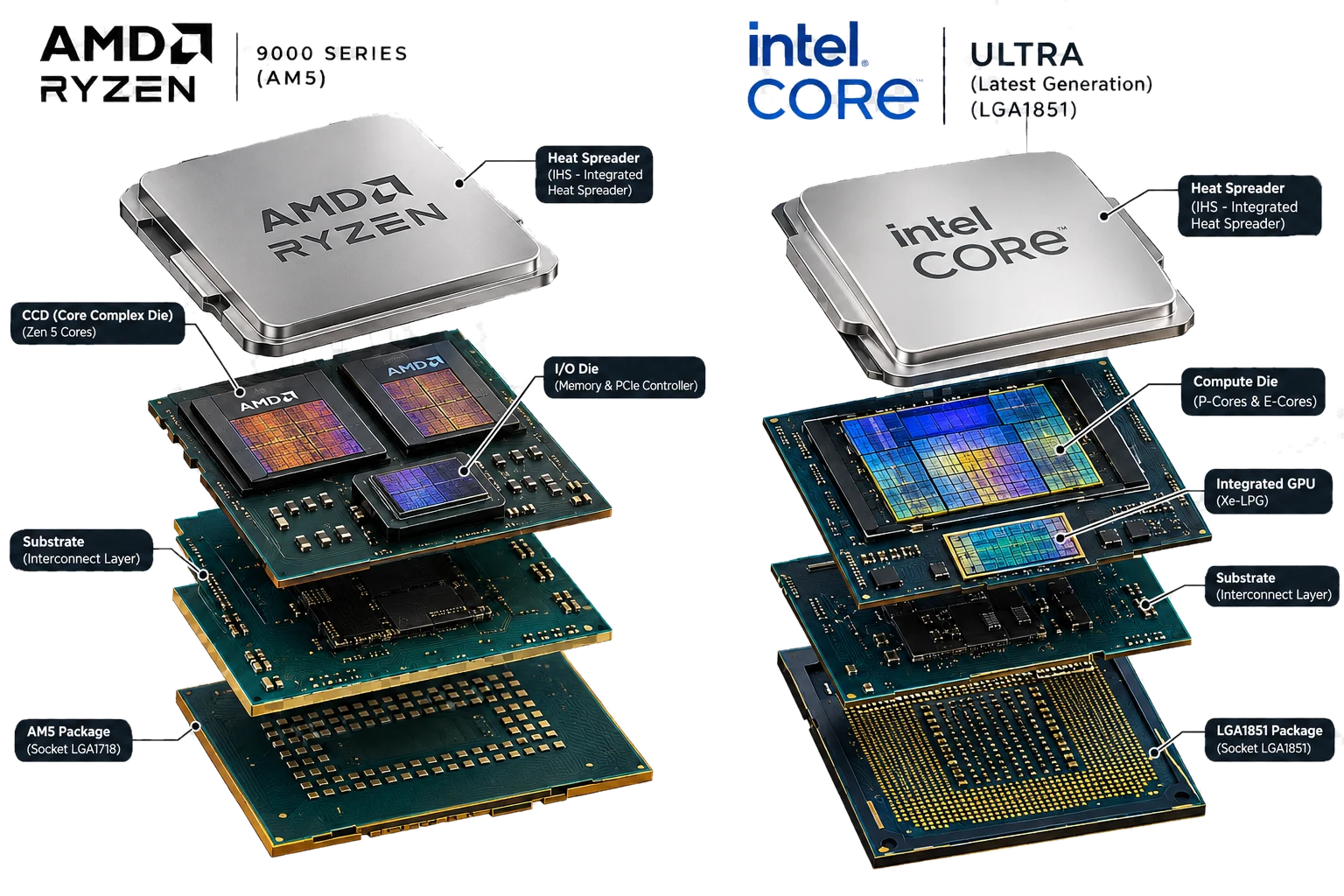
Processor (CPU): the brain of the PC
Every instruction your games and apps run goes through the CPU. Under the metal lid are tiny silicon dies packed with cores.
What each layer does
- Heat spreader (IHS)
- The metal lid. It carries heat from the chips underneath to your CPU cooler.
- Core dies (CCD / compute tile)
- Where the cores are, the part doing the actual work. AMD Ryzen 9000 uses one or two 8-core Zen 5 chiplets; Intel Core Ultra mixes fast P-cores with efficient E-cores.
- I/O die
- Links the cores to your memory (DDR5) and to the graphics card and SSDs over PCIe.
- Integrated graphics
- Basic graphics built in, enough for office work and video. Gamers still add a graphics card. Intel models ending in “F” (e.g. i5-14400F) have none, so they always need one.
- Substrate & package
- The green board that wires the chips to the pins or pads underneath. Its shape is the socket: AM5 for AMD, LGA1851 or LGA1700 for Intel.
When choosing yours
- Games love fast cores and big cache. AMD's “X3D” chips are the gaming favourites.
- Rendering, video editing and streaming scale with more cores.
- The CPU socket must match the motherboard. Our builder checks this for you automatically.
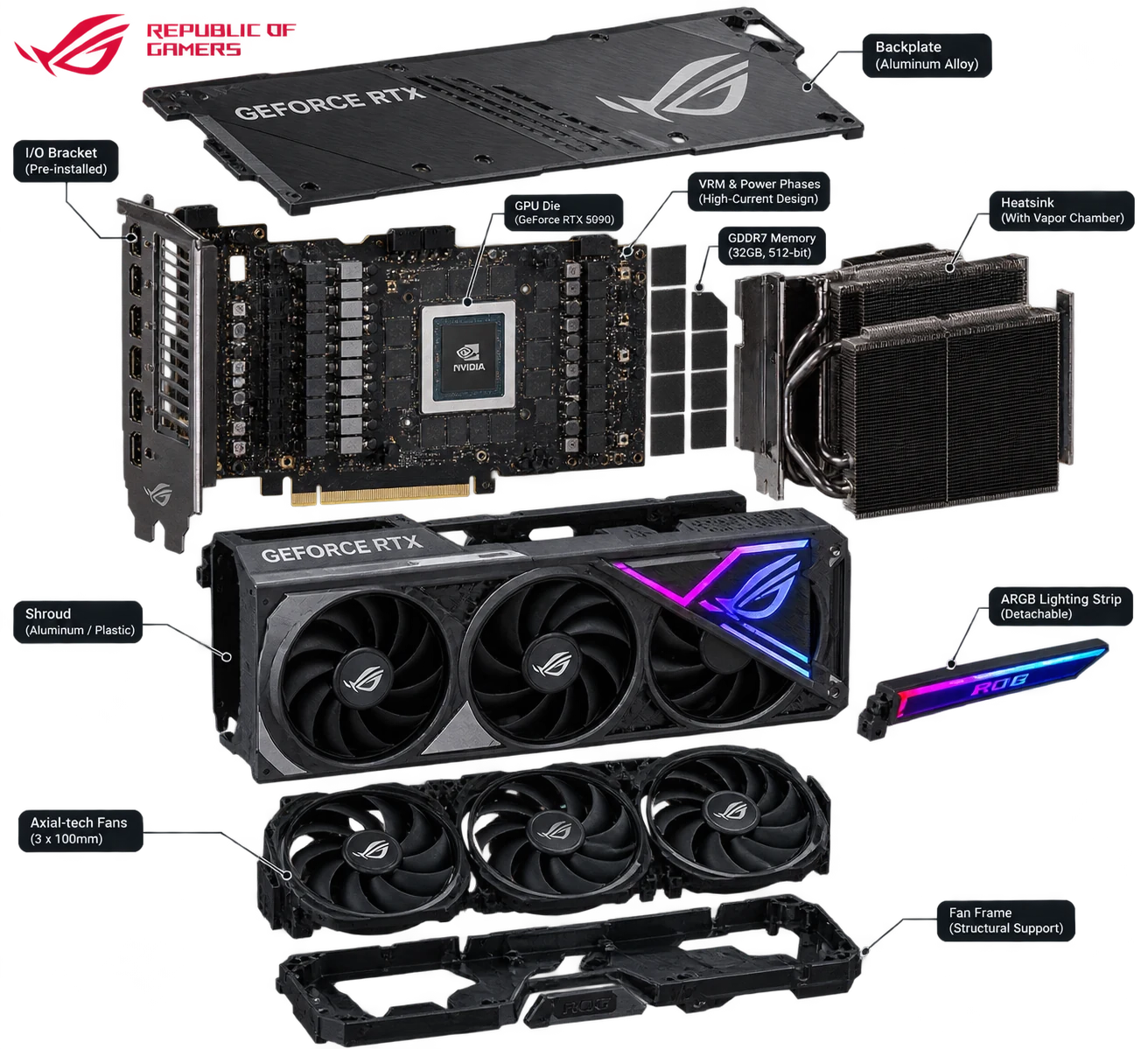
Graphics card (GPU): what draws every frame
For gaming, the graphics card matters more than anything else. It draws every frame you see, and most of it is cooling.
What each layer does
- GPU die
- The graphics processor itself, thousands of small cores working in parallel.
- Video memory (VRAM)
- Fast GDDR6/GDDR7 memory for textures. 8GB is fine for 1080p; 12–16GB suits 1440p, 4K, heavy mods and AI tools.
- VRM & power phases
- Turn the power supply's power into the clean, steady power the GPU needs under load.
- Heatsink & vapor chamber
- Pull heat away from the chip. A bigger cooler can run slower, and quieter.
- Fans, shroud & backplate
- Push air through the heatsink, protect the board and add style (and RGB).
- I/O bracket
- The HDMI and DisplayPort outputs your monitor plugs into.
When choosing yours
- Pick your GPU first for gaming, then use “Will my PC run it?” in the builder to check it against your games' official requirements.
- Big cards need a strong power supply and enough case length. The builder checks the power supply for you.
- More VRAM keeps high-resolution textures smooth for longer.
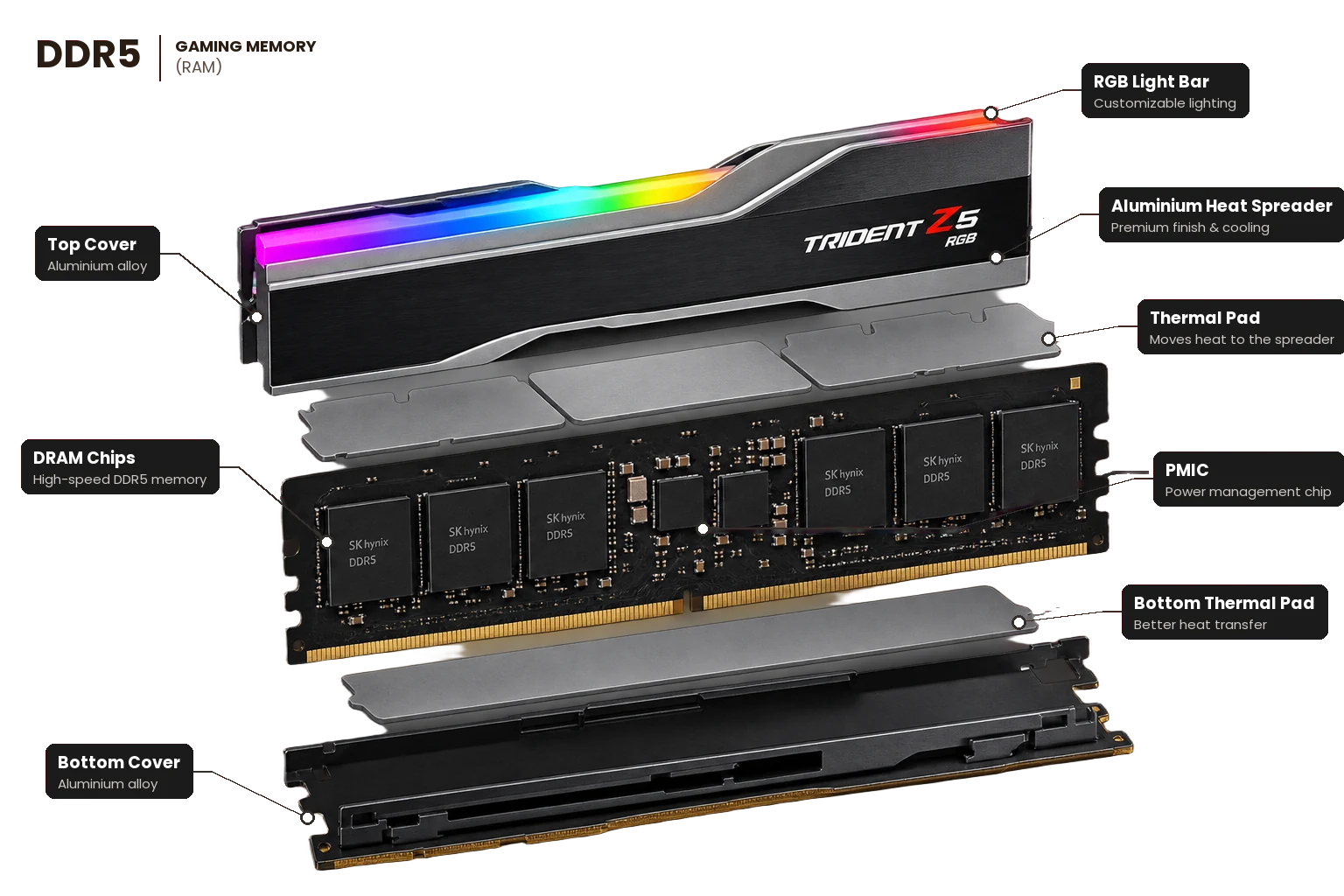
Memory (RAM): the PC's short-term workspace
RAM holds whatever your PC is working on right now: the game you're playing, your browser tabs, the video you're editing. More RAM means more running at once without slowdowns.
What each layer does
- Heat spreader & covers
- The aluminium shell. It spreads heat from the chips (DDR5 runs a little warm) and protects the stick.
- RGB light bar
- Optional lighting you can colour-match to the rest of your build using the motherboard's software.
- Thermal pads
- Soft pads that pass heat from the memory chips into the heat spreader.
- DRAM chips
- Where your data actually sits. The number and size of these chips set the stick's capacity.
- PMIC (power chip)
- New with DDR5: each stick manages its own power, for steadier voltage at high speeds.
- Gold contacts & notch
- Connect the stick to the motherboard. The notch sits in a different place on DDR4 and DDR5, so the two can't be swapped.
When choosing yours
- 16GB is fine for everyday use and light gaming. 32GB is the sweet spot for gaming and multitasking, and 64GB+ suits editing, 3D and virtual machines.
- Use two sticks (e.g. 2×16GB) rather than one. Dual-channel is noticeably faster.
- Speed and latency both count: for AMD Ryzen, DDR5-6000 CL30 is the sweet spot. The builder checks DDR4/DDR5 matches your motherboard.
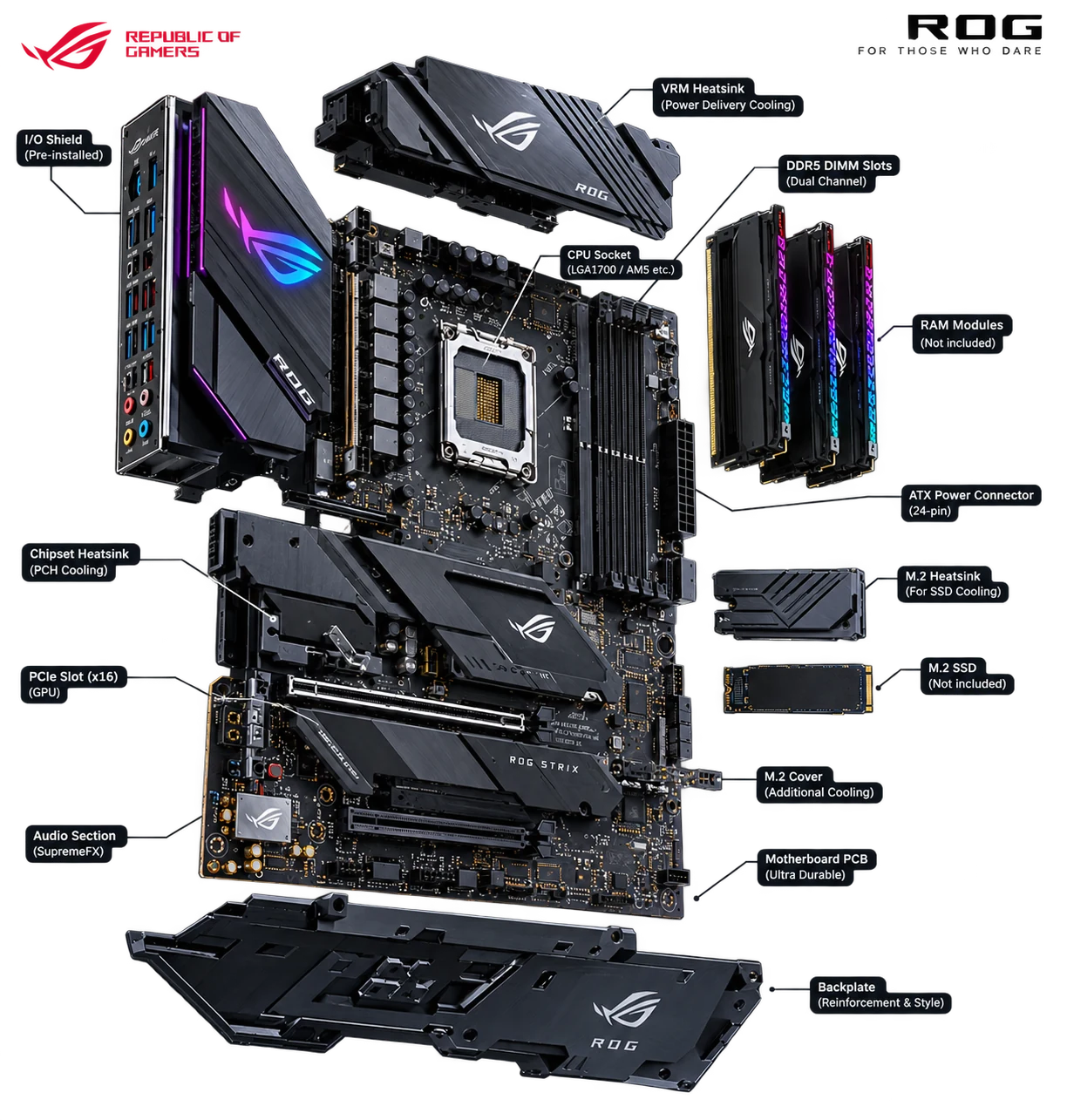
Motherboard: connects everything
Every other part plugs into the motherboard. It decides which CPU, memory and how many SSDs you can use.
What each layer does
- CPU socket
- Holds the processor. It must match the CPU: AM5 for AMD Ryzen, LGA1851 or LGA1700 for Intel.
- Memory (DIMM) slots
- Hold the RAM. Newer boards take DDR5; some older and budget boards take DDR4. The two don't mix.
- VRM & heatsink
- Power the CPU. Stronger VRMs keep high-end CPUs running at full speed.
- PCIe x16 slot
- Where the graphics card goes.
- M.2 slots & heatsinks
- Fast NVMe SSDs sit here, under heatsinks that stop them slowing down when hot.
- Chipset, audio & rear I/O
- USB, network, Wi-Fi and audio ports, plus the 24-pin power connector from the power supply.
When choosing yours
- Match the socket to your CPU and the memory type (DDR4 or DDR5) to your RAM.
- Board size (ATX, mATX, ITX) has to fit your case.
- The builder checks all three automatically, so incompatible parts are flagged before you order.
Illustrations are for learning. Brand names and logos belong to their respective owners, and the parts in your build may look different.